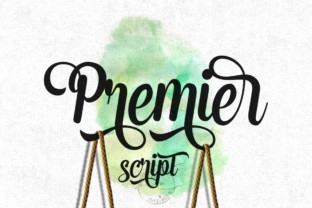
Premier Font: Elegant Script for Web Design
As a web designer, choosing the right font can make or break a design. Premier is a smooth and playful script that brings a unique energy to digital projects. With over 400 glyphs, it offers a wide range of characters, symbols, and stylistic alternates, making it a versatile choice for creative typography.
Premier’s visual characteristics are defined by its smooth lines and curves, which give it a refined yet approachable feel. It maintains a natural hand-lettering quality, making it ideal for designs that need a personal touch. This font works well in both digital and print environments, especially when paired with modern, clean typefaces.
Premier in Web Design: Headers, Hero Sections, and More
When used in headers, hero sections, or call-to-action areas, Premier adds a sense of personality and visual interest. Its fluid strokes make it perfect for landing pages where you want to capture attention without overwhelming the viewer. For example, a boutique online store might use Premier for product titles or promotional banners to create a cohesive, stylish look.
In UI design, Premier can be used for buttons, icons, or decorative accents. However, it’s best suited for short phrases rather than long paragraphs. The font’s readability decreases at smaller sizes, so it’s not ideal for body text. Instead, use it as a highlight or secondary element that complements more legible fonts.
Brand Tone and Visual Hierarchy
Premier helps establish a brand’s tone by adding a human, handwritten feel to digital content. It’s particularly effective for brands that want to convey creativity, warmth, or authenticity. Whether you're designing a coaching website, a blog header, or a course sales page, Premier can reinforce the brand’s identity through its expressive style.
For visual hierarchy, Premier excels as a display font. It draws the eye and sets the tone for key elements on a page. When paired with a simple sans serif or serif font, it creates a balanced contrast that enhances readability and structure. This pairing is common in editorial design, where a bold, elegant script supports a clean, professional layout.
Mobile and Responsive Design Considerations
On mobile screens, Premier’s legibility depends on the size and spacing. Use it for large headers or prominent labels, but avoid small text on dark backgrounds or image overlays. When working with responsive layouts, ensure the font scales properly across devices and maintains clarity at different breakpoints.
For online stores or e-commerce sites, Premier can be used in banners, product titles, or logo text. Its playful nature adds a touch of uniqueness that stands out in a crowded market. Just remember to keep it consistent and not overuse it—too much of a good thing can dilute its impact.
Font Pairing and Design Assets
Pairing Premier with other fonts can elevate your design. A common approach is to use it alongside a neutral sans serif for body copy, allowing the script font to shine without competing. For a more editorial look, pair it with a serif font to add depth and sophistication.
When selecting fonts for a project, consider the font’s file formats, weights, and multilingual support. Premier likely includes multiple styles and alternate characters, giving you flexibility in how you apply it. Check the available options to ensure they meet your project’s needs.
Commercial Licensing and Digital Projects
If you’re using Premier for client work, an online store, or a digital template, make sure you have the proper commercial license. This ensures you can use the font across various platforms without legal issues. Always verify the licensing terms before integrating the font into your design assets.
Premier is a powerful tool for web designers looking to add character and elegance to their digital projects. Its smooth, playful style makes it ideal for headers, logos, and decorative elements. By understanding its strengths and limitations, you can use it effectively to enhance user experience and brand identity.
Whether you're building a creative portfolio, a SaaS landing page, or a branded web experience, Premier offers a fresh, dynamic option that fits a wide range of design needs. With careful application, it can become a signature element of your digital work.